WHAT IS A RAID SYSTEM?
What is a RAID system?
- Data redundancy and therefore disaster recovery.
- Optimization and speed, which will allow for performance.
- A combination of the two previous ones, providing a compromise between speed and security.
- A single volume with multiple hard drives.
RAID DISK PROBLEMS
- The RAID is inaccessible
- A disk has been replaced and the RAID has stopped working
- The RAID has been REBUILD and other RAID disks have failed
- The RAID controller has been damaged and the logical drive or LUN cannot be remounted.
- The RAID disks make noises or warning lights turn on on the controller.
- The RAID does not work after restarting the machine or computer.
RECOVERING DISKS FROM RAID
If you're having issues with your RAID disks, at Laby we can offer you a solution: We know how to recover lost data from RAID disks. Our technical team has experience in recovering any type of RAID system.
Trust Laby — we can recover the information from your RAID drive.
Trust Laby, we can recover your RAID system information.
TIPS TO AVOID LOSING DATA
It is important to know what type of RAID we want to perform and look to the future to be scalable. We can define RAID tipology within three options: Speed, capacity, security and then, a mixed tipology. It is also important to know what type of content will be stored inside the RAID in order to configure the BLOCK SIZE.
This will determine the write/read speed as well as the capacity that will remain after performing file copy operations.
If you are looking for full capacity and speed, you should opt for RAID 0. This will provide a drive whose capacity will be the sum of all the devices (3 x 1TB disks will provide a 3TB drive in total). It is an extremely fast system (it allows writing and reading on all three disks simultaneously), but in case of loss of a disk, all information will be lost.
If you are looking for security, you should opt for RAID 1. This will provide a drive whose capacity is half of the drives (2 x 1TB disks will provide a 1TB drive in total). It is a slow system, because it has to write in both devices at the same time the same information, although it is a fast reading system (it can read from both simultaneously).
In case of loss of a disk, you will be able to work with the other disk, replace the damaged one and the system will perform a “REBUILD” of the damaged disk to continue working normally. This process will make your system slow
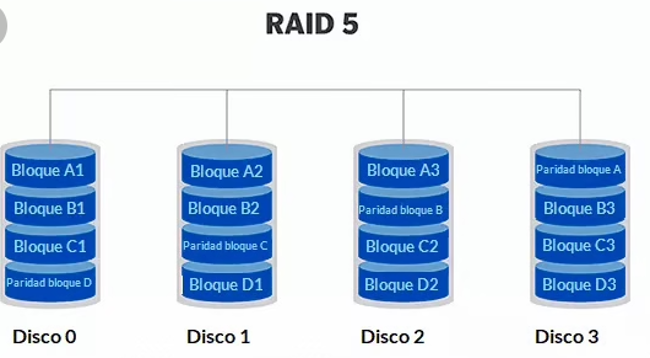
If you are looking for something in between, you can opt for a RAID 5. This will provide a unit whose capacity will be N= N-1 N where N will be the number of disks in the RAID (Minimum 3 disks). For example 5 x 1TB disks will offer a capacity of 4TB available. With RAID 5 it is possible to lose a device and continue working, replace the damaged one and the system will perform a “REBUILD” of the damaged disk to continue working normally. This process will make your system slow
RAID 6, could be considered an extension of RAID 5 where it allows two simultaneous disks to be broken and the system to continue working.
However, the following should be kept in mind: During a REBUILD the disks are made to work at maximum performance. If we add to this process the workload requests by users, programs or similar, we will be forcing the disks to a high level of stress. This should not be a problem a priori, but in most cases the disks already have many hours of work and their surface or reader units are not at 100% performance so it is possible that the REBUILD fails in the middle of the process, leaving the system and/or the RAID data inaccessible.
To avoid this situation it is interesting to have a disk replacement plan according to the use and workload of the RAID system. Likewise, it is essential to configure the disk alerts and control the RAID periodically to ensure that there is no anomaly, since one of the disks may fail without realizing it and after a few months another one may fail.
HOW DO WE CARRY OUT THE DATA RECOVERY
PROCESS FROM RAID SYSTEMS?
In just 1 HOUR
We arrange pickup through a courier service.
Within 4 Business Hours
After receiving the device at the lab (within 24h), we carry out a diagnosis and no-obligation quote within a maximum of 4 business hours.
Between 4 and 7 business days
This is the average recovery time, in business days, for the damaged device*
WE EXPLAIN IT TO YOU IN A VIDEO
THIS IS HOW WE RECOVER YOUR DATA STEP BY STEP
Transparency, technology, and expertise at every stage of the process. Watch the video and discover how we work.
WHY CHOOSE US? - THE ADVANTAGES OF
RECOVERING DATA WITH US
Customers
Analyzes performed
Spare parts
Experience
Free collection and delivery service (*)
Free diagnosis and quote
Real-time tracking through our intranet
If we don’t recover your data, you don’t pay
Free customer support phone line
Electronics Laboratory and Class 100 Clean Room
Qualified technical staff and ongoing training
Service with European-wide coverage
* If the device is unrecoverable or the quotation is rejected, courier charges will be charged.

ISO 9001
Laby operates a quality management system certified in accordance with the international ISO 9001:2015 standard, ensuring efficient processes, continuous improvement and a high level of customer satisfaction in every project.
INCIBE
Laby is registered with the National Cybersecurity Institute (INCIBE), reinforcing its commitment to best practices in cybersecurity, digital protection and information security.
ISO 27001
Laby operates an information security management system certified under the international ISO/IEC 27001:2022 standard, ensuring the confidentiality, integrity and availability of data.

HOW MUCH DOES RAID DATA RECOVERY COST?
RAID SYSTEM DATA RECOVERY PRICES
The price for recovering data from RAID systems will always depend on the damage suffered by the device, together with the working hours and technical equipment required to carry out the recovery processes.
In any case, a prior diagnosis is necessary to detect the type of failure or combination of several failures.
The best is to let OUR CLIENTS speak for us
Our 300+ reviews are published on Google
Average rating: 4.7 out of 5
Publicado en Alfonso Garcia Parellada25/10/2025 Muy contento. Contacté con Laby porque mi disco duro había dejado de funcionar después de que se me cayera al suelo, y desde el principio hubo transparencia: rango de precios, un primer diagnóstico gratuito para determinar los daños y establecer el presupuesto final, e información de cómo iba a ir todo el proceso de recuperación en caso de aceptar el presupuesto. Me dieron a elegir entre proporcionar yo el nuevo disco duro donde verter los datos recuperados o dejar que ellos lo proporcionaran e incluyeran en la factura final y escogí lo segundo. El proceso (enviar mi disco, que ellos lo analizaran, recuperaran los datos y los volcaran en un disco duro nuevo, y que yo recibiera el nuevo dispositivo en mi domicilio) duró apenas 3 semanas. En resumen, transparencia, profesionalidad y diligencia. Muchas gracias por todo.Publicado en ilona szekeres10/10/2025 100% recomiendo!!!!! Son tan amables y salvaron 100% de mis datos en mi disco duro que ya no funcionaba. Genios!!!!!!!! Y tan amables!!!!! Tan amable la recepción! TE SALVAN TUS DATOS!!!! 100% recomiendo.Publicado en Nassiel Alaunaery10/10/2025 Excelente trato, recuperación total incluso de un sistema entre varios discos duros para tenerlo todo operativo, muy flexibles y profesionales. Un 11 de 10.Publicado en Pilar García09/10/2025 Muy profesionales: me dieron rango de precios desde el principio y después el presupuesto final tras un primer diagnóstico. Todo el proceso ha sido organizado y transparente gracias a su plataforma donde van documentando todo y subiendo facturas. Permiten que les envíes el dispositivo, y puedes comprobar remotamente lo que se ha podido recuperar si la recuperación no ha sido completa. Muy contenta con el proceso y los resultados.Publicado en Franx J.02/10/2025 La experiencia ha sido excelente. Disponen de un sistema súper cómodo para enviar el disco, realizar los pagos y mantener la comunicación en todo momento. Me han rescatado el 100% de los datos y, si algún día tuviera que volver a hacerlo, sin duda lo haría otra vez con ellos. Servicio totalmente recomendable.Publicado en Macavi29/09/2025 No tengo palabras suficientes de agradecimiento para esta empresa. Hace unos días me encontré que un archivo Word, con el que llevaba años trabajando se volvió corrupto. Era muy importante para mí, y después de pasar por varias empresas, pagar y no obtener resultados, contacté con Laby como última opción. Tengo que decir que son unos profesionales de pies a cabeza. Te abren una ficha, te informan de todo el proceso al momento y te hacen un presupuesto antes de empezar (si no recuperan no cobran), cosa que me parece importantísimo porque venía de pagar sin obtener nada. Las chicas de la recepción: majísimas. Amables, cordiales, risueñas....Y qué decir de Eduardo, no tuve oportunidad de conocerte, pero si lo hubiese hecho te hubiese abrazado. Me has salvado la vida. Eres un crack!!! GRACIAS A TODOS.Publicado en Vicente Miaja23/09/2025 Excelente servicio, comunicación y trato con el cliente. Sin duda volvería a recurrir a ellos en caso de necesitar de sus servicios.Publicado en Jorge Franco18/09/2025 ¡¡Muy buena experiencia y 100% recomendable!! Todo muy fácil y rápido. Atención al cliente muy buena, presupuesto con todo detallado y en comunicación constante por correo y teléfono sobre cómo van los trabajos de recuperación. Recogida y entrega a domicilio muy rápido e incluido en el precio. Detalles muy cuidados en la entrega del paquete. Como pega, el precio un poco elevado, pero dentro de mercado.Publicado en Ivan17/09/2025 Me acerque a la tienda física ya que no me fiaba y no existe.Publicado en eduardo replinger12/09/2025 No puedo expresar con palabras la satisfacción que siento con vosotros, desde el primer momento el trato ha sido excelente. Organizasteis la recogida de mi disco duro en el mismo día y al siguiente ya lo teníais para valorarlo y una vez que acepté el presupuesto os pusisteis manos a la obra. Habéis hecho el trabajo rapidísimo, en tiempo record, y habéis salvado unos archivos que para mí eran de vital importancia. Gracias por todo, vuestro trato y cercanía es inmejorable.
If we don't recover your data, we don't get paid
WHAT DEVICES CAN WE RECOVER AT LABY?
Data Recovery from Mechanical Hard
HDD disks have as main components the metal plates (disks), where the data is stored, and the heads that are responsible for accessing the information. The most common hard disk.
SSD Hard Drive Recovery
SSDs do not move, hence the name solid state. The information is stored in blocks and no headers are required to access it. It is much more efficient and faster than an HDD hard disk.
External Hard Disk Drive Recovery
External hard disks allow us to store outside the computer all the important information of which we want to make a backup copy. But one failure can cause us to lose all this data.

iPhone, iPad, iMac or MacBook
Apple devices, including iPhone, iPad, iMac, MacBook, Mac Mini, etc. They are reliable, elegant, powerful and easy to use.
Laptop Hard Drive Data Recovery
On the laptop hard disk we store important work or home information. If a failure occurs, it can cause us to lose all this valuable personal data.
Data Recovery NAS, SAN and
A SAN, NAS or DAS disk is a compact enclosure consisting of several hard disks that are connected via a network cable to the system, hence the common name network hard disk.
Data recovery from RAID systems
RAID disks are a redundant group of independent disks. They can be HDD disks or SSD disks and together they form a storage system to distribute or replicate data.
Recovery of USB Flash Drives
Pen drives or USB flash drives consist of one or more memory blocks. They work in many cases like SSD devices (same Flash technology).
Memory Card Recovery
Memory cards are used to store information from devices such as cameras, cell phones or tablets. They differ in their storage capacity and read/write speed.
Ransomware or Virus Recovery
We recover data encrypted with viruses or ransomware. Ransomware is extortive software: its purpose is to prevent you from using your device until you have paid a ransom. Depending on the type of ransomware, either the entire operating system or only some files are encrypted.

Mobile and Tablet Recovery
In mobile devices such as smartphones or tablets, recovery processes can be performed by analyzing the electronics of the damaged components or by performing the chip off process.

FAQs ABOUT RAID SYSTEMS
A RAID (Redundant Array of Independent Disks) system is a technology that combines multiple storage units into a single logical array to improve performance, capacity or data redundancy. Depending on the type of RAID chosen or configured, we will have higher read and write speed, greater storage capacity, greater fault tolerance and in some cases the ability to recover data in the event of a drive failure.
A RAID system works by distributing data across a minimum of two drives up to multiple hard drives in different configurations. Common configuration methods include RAID 0, RAID 1, RAID 5, RAID 6 and RAID 10.
In RAID 0, data is striped and stored on different disks, which improves performance, but does not provide any security.
In RAID 1, data is mirrored on two disks to provide greater security and fault tolerance at the expense of write performance.
RAID 5, RAID 6 and RAID 10 combine performance and redundancy features through the use of parity or CRC calculations of stored data, either on the disks themselves or to additional drives within the RAID itself.
The main parts of a RAID system include the storage drives (mechanical hard disks or SSDs), a RAID controller (hardware or software) that manages the write and read operations of the disks, and a management system (usually an O.S. such as Windows or Linux) that allows the RAID operation to be configured and monitored. In addition, connecting cables such as SATA, SAS, FC (Fiber Chanel) and specific adapters (enclosures) may be used to connect disks.
If your RAID system has stopped working, it may indicate a possible failure of one or more storage drives, an error in the RAID configuration, or a problem with the RAID controller. It is recommended to check the drive connections, make sure the RAID controller is working properly and verify the RAID configuration. It is also advisable to perform an updated data backup before attempting any solution to minimize the risk of data loss.
The chances of recovering data from a damaged RAID system depend on several factors, such as the cause and severity of the failures, the RAID level used, and the availability of specialized tools and expertise. In some cases, it is possible to recover data using specialized data recovery software and techniques. However, when the failure comes from the storage drives, depending on the type of RAID used, recovering data on a damaged RAID can be a complex process. It is advisable to consult with a specialized data recovery lab to assess the RAID status and determine the options available to recover the data.